When planning a conference or trade show, badge design is often viewed primarily as a branding exercise. The badge needs to display the attendee's name, company, registration type, event logo, sponsor information, and other details that make it easy to identify who is attending.
But there is another small element on the badge that can have a much bigger impact on the event than its size would suggest: the barcode.
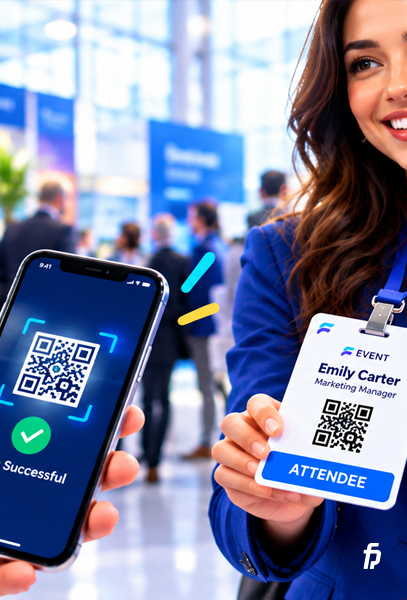
A barcode, and particularly a QR code, gives an attendee a machine-readable identity that can be used across multiple parts of the event. It can start with the registration confirmation, help staff quickly locate an attendee's record and print their badge, and then continue to serve a purpose after the badge is printed.
That same badge barcode can be used for session tracking, CEU and CME credit tracking, certificate issuance, exhibitor lead retrieval, attendee engagement tracking, and other event applications.
In other words, a barcode is not simply something you put on a badge because it looks like it belongs there.
It can become the common identifier that connects the attendee to the technology used throughout the event.
Start With the Barcode, Not the Badge
The value of a badge barcode begins before the attendee ever receives the badge.
When an attendee completes online registration, the registration system can generate a unique barcode or QR code associated with that attendee's registration record. That code can be included in the attendee's registration confirmation or sent as part of a digital check-in credential.
When the attendee arrives onsite, staff can scan the code to quickly locate the attendee's registration record. Alternatively, attendees can scan their own confirmation at a self-service badge-printing kiosk.
Instead of searching through a registration list by name, a quick scan retrieves the correct record. The system can then verify the attendee's registration status and print the appropriate badge, whether the process is handled by staff or through a self-service kiosk.
This is especially useful at busy registration areas where speed matters.
Once the badge is printed, it contains its own barcode or QR code for use throughout the event.
This creates a simple flow:
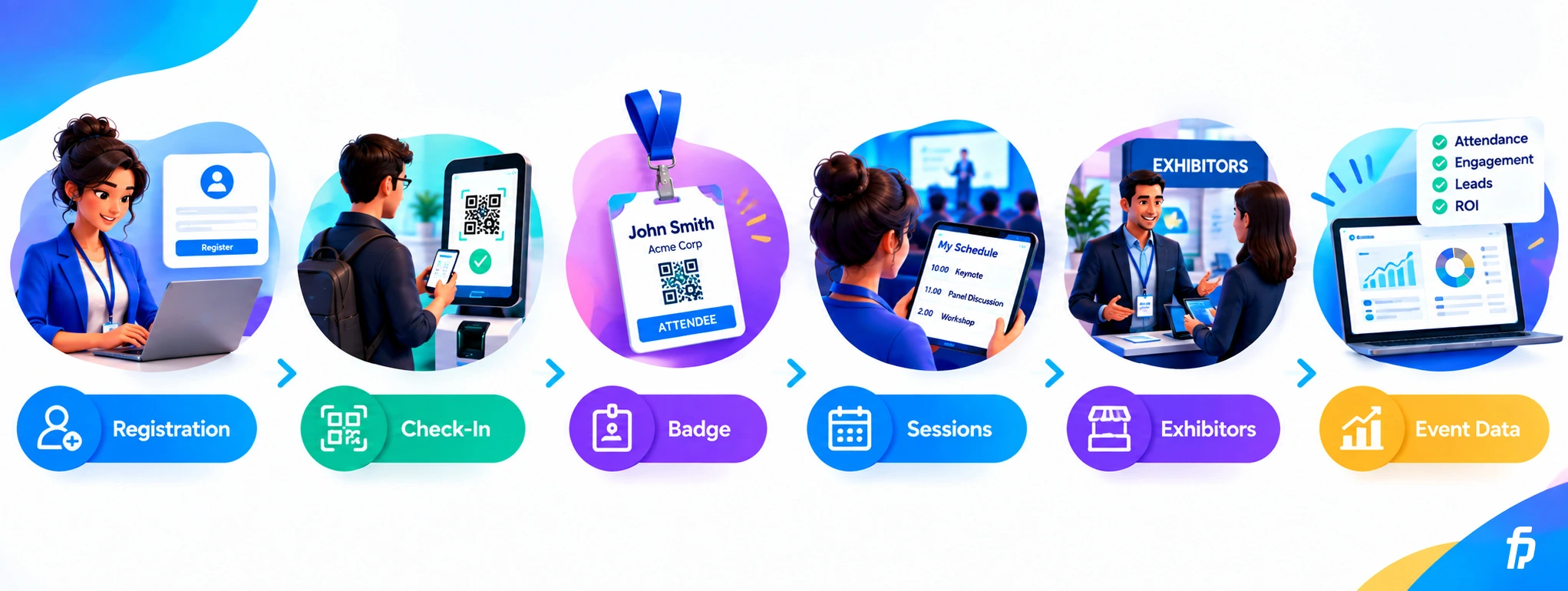
The barcode doesn't have to serve a different purpose at every stage. The same unique identifier can connect these interactions back to the attendee's record.
For example, fpReg, Fairplicity's online registration system, can associate a unique barcode with an attendee's registration. fpBadge, Fairplicity's onsite badge printing software, can use the attendee's barcode at check-in to locate the registration record and print the attendee's badge.
The result is a much more efficient process than treating registration, badge printing, session tracking, and lead retrieval as completely disconnected activities.
Why Every Event Badge Should Have a Barcode
A barcode on an event badge creates a simple way to identify an attendee without requiring someone to manually enter or search for information.
That matters because badges are used in many places beyond the registration desk.
Faster Check-In and Badge Printing
At event check-in, the attendee's barcode from their registration confirmation can be scanned to retrieve their registration record.
Once the attendee's record is located, the system can determine what badge should be printed and send the information to the badge printer.
After the badge is printed, it contains its own barcode or QR code for use throughout the event.
This makes the barcode a bridge between online registration and onsite event operations.
Instead of creating a barcode only after the attendee arrives, the attendee can already have a unique scannable identifier when they arrive at the event.
Session Tracking Without Paper Sign-In Sheets
Session tracking is another important application for badge barcodes.
At many conferences, simply knowing that someone registered for a session is not enough. Organizers may need to document actual attendance for CEU, CME, continuing education, certification, or certificate issuance.
A badge barcode provides an efficient way to capture that attendance.
For example, an organizer can use a kiosk-style session tracking application where attendees scan their own badges as they enter a session. The scan records the attendee's presence and associates it with the specific session.
Fairplicity's fpSessions can be used for this type of session tracking, allowing organizers to capture attendee participation across conference sessions and maintain the attendance information needed for continuing education and certificate-related requirements.
This eliminates many of the problems associated with paper sign-in sheets, including illegible handwriting, duplicate entries, missing signatures, and the manual work required to transfer attendance information into a database.
For conferences where attendees participate in multiple sessions, that information can be used to determine eligibility for CEU or CME credits and to support certificate issuance after the event.
Exhibitor Lead Retrieval
The badge barcode also plays an important role on the exhibit floor.
When an exhibitor scans an attendee's badge using a lead retrieval application, the scan can identify the attendee and retrieve the information associated with their registration record.
The exhibitor can then qualify the lead, answer survey questions, add notes, assign a lead rating, and record follow-up information.
This is very different from simply exchanging business cards.
The attendee does not have to dictate their contact information, and the exhibitor does not have to manually enter it after the conversation. The badge provides a consistent identifier that connects the exhibitor's interaction with the attendee's event record.
Modern lead retrieval applications can also operate offline, which is particularly important on busy exhibit floors where Internet connectivity may not always be reliable.
Fairplicity's fpLeads is built around this model, allowing exhibitors to scan an attendee's badge, capture qualification information, and manage their leads from a mobile device.
Connecting Attendee Interactions
Once the same attendee identifier is used across different event applications, the barcode becomes more than a check-in tool.
It can help connect different parts of the attendee experience.
An organizer may be able to determine:
• When an attendee checked in
• Which educational sessions they attended
• Which exhibitors they visited
• Which activities they participated in
• Which educational requirements they completed
• What information is needed for certificates or continuing education records
Each scan represents a small piece of information. Together, those interactions can provide a much clearer picture of how attendees participated in the event.
This is where badge barcodes become particularly valuable to organizers.
What Should a Barcode Contain?
The barcode itself does not need to contain all of the attendee's registration information.
In modern event applications, the barcode can simply represent a unique attendee identifier.
When the barcode is scanned, the application uses that identifier to locate the attendee's record in its database or in data that has already been downloaded to the device.
This is an important distinction from older barcode-based systems where more attendee information was sometimes encoded directly into the barcode.
Today's mobile event applications can use a much simpler approach.
The barcode can contain a unique ID while the attendee's name, company, email address, registration type, session information, and other data remain in the event system.
This approach also makes the barcode more reusable. If an attendee changes their email or other registration information, the underlying attendee record can be updated without necessarily changing the barcode printed on the badge.
The exact identifier and barcode format should, however, be determined by the applications that will scan it. Registration, badge printing, session tracking, and lead retrieval systems need to be configured to recognize the same identification scheme.
QR Code or Traditional Barcode?
There are several barcode formats that can be used on event materials and badges.
A QR code is often an excellent choice for events because it can be generated easily, printed at relatively small sizes, and scanned by modern smartphones, tablets, and dedicated scanning devices.
Traditional one-dimensional barcodes can also work very well, particularly when the registration, badge printing, or lead retrieval system is designed around a specific barcode format.
The important consideration is not simply which barcode looks better.
The barcode format should match the technology that will be scanning it.
Before selecting a barcode format, organizers should determine:
• Which applications will scan the code
• What identifier those applications expect
• What devices will be used
• How large the barcode needs to be
• Where the barcode will be positioned on the badge
• Whether the barcode needs to be scanned through a badge holder or other covering
A barcode that works perfectly in one system may not be compatible with another. Planning the barcode as part of the overall event technology strategy avoids problems later.
How Do You Create a Barcode or QR Code?
Creating barcodes and QR codes does not necessarily require a specialized barcoding system.
The right method depends on the size of the event, the systems already being used, and whether badges will be pre-printed or produced onsite.
Use Your Registration or Badge Printing Software
For events using an integrated registration and badge printing solution, barcode generation can be part of the normal workflow.
For example, an online registration system can assign a unique identifier and generate a QR code for each attendee. That QR code can appear on the registration confirmation.
At the event, the code can be scanned to locate the attendee's record and print the badge.
The same identifier can then be printed on the badge and used by session tracking and lead retrieval applications.
This is one of the advantages of using systems that are designed to work together. The organizer does not have to create and manage a separate barcode process for every application.
Use Microsoft Word and Mail Merge
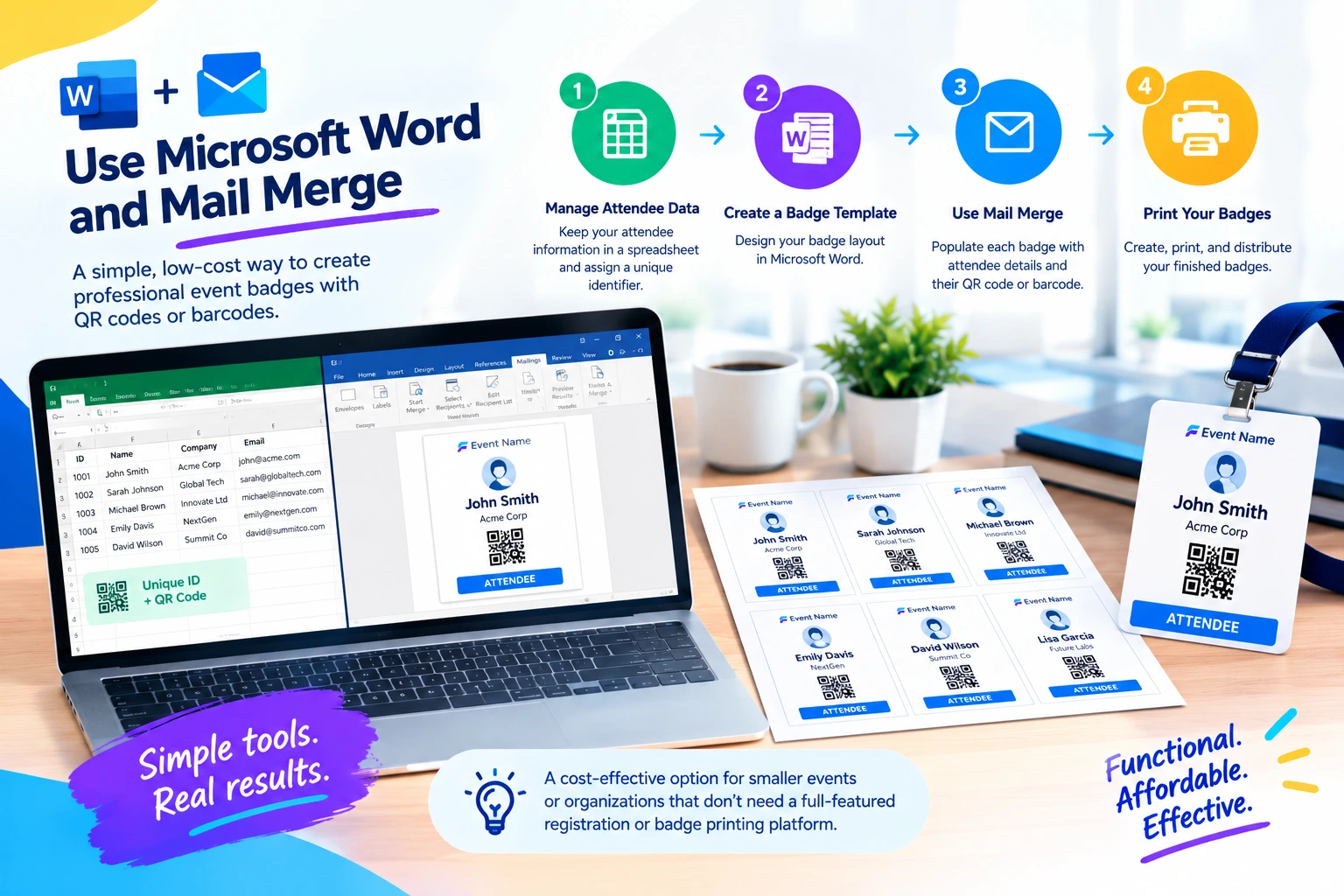
For smaller events and organizations looking for a low-cost solution, Microsoft Word and Mail Merge can be used to create pre-printed badges containing QR codes or barcodes.
An organizer can maintain attendee information in a spreadsheet, use a unique attendee identifier, and create a badge template in Word. Mail Merge can then populate each badge with the attendee's information and corresponding QR code.
This can be a practical option when an event does not require a full-featured registration or badge printing platform.
It is also a good example of how inexpensive tools can be used to create a functional barcode-based badge system.
We will cover this process in a separate step-by-step article, including how to prepare the attendee data, generate the QR codes, create the Word badge template, and produce the finished badges.
Use a Barcode or QR Code Generation Tool
There are also dedicated barcode and QR code generation tools that can create codes from attendee IDs or other unique identifiers.
These can be useful when creating a small number of badges or when the organizer already has an established process for producing the attendee data.
For a larger event, however, manually creating hundreds or thousands of individual codes is not practical. The process should be automated through the registration, badge printing, spreadsheet, or mail merge workflow.
Three Ways to Produce Badges With Barcodes
Once an organizer has established the barcode and how it will be generated, there are several ways to produce the physical badge.
The three most common approaches are pre-printing, on-demand printing, and a hybrid approach.
1. Pre-Printed Badges
With pre-printed badges, attendee badges are produced before the event, usually after registration information reaches a predetermined cutoff date.
Each badge can contain the attendee's name, company, registration type, and unique barcode or QR code.
Pre-printing can be especially effective when most attendees register well before the event.
Benefits include:
• Badges are ready before attendees arrive
• Fast badge pickup onsite
• Less printing equipment required at the registration area
• Consistent printed quality
• Less onsite processing for attendees who registered in advance
The tradeoff is that attendee information can change between the printing deadline and the event.
Organizers therefore need a process for handling late registrations, cancellations, registration changes, and lost badges.
2. On-Demand Badge Printing
With on-demand badge printing, the badge is generated and printed when the attendee arrives.
The attendee's registration confirmation barcode can be scanned to locate their record. The system retrieves the appropriate information and prints the badge.
This approach provides significant flexibility.
Late registrations, walk-ins, registration changes, and badge reprints can all be handled onsite without having to produce every badge in advance.
A dedicated onsite badge printing solution such as fpBadge can manage this process, including attendee lookup, badge printing, reprints, and other onsite registration needs.
3. A Hybrid Approach
A hybrid approach combines the advantages of both methods.
An organizer might pre-print badges for attendees who register before a predetermined deadline while using onsite printing for:
• Late registrations
• Walk-ins
• Speakers and staff
• Exhibitors
• Registration changes
• Badge replacements
This approach can reduce onsite printing volume while still giving the organizer the flexibility to handle exceptions.
For many events, the question isn't whether to pre-print or print onsite.
It is deciding which attendees should be pre-printed and which should be handled on demand.
Designing a Badge That Scans Reliably
Putting a QR code or barcode on a badge is only part of the job.
The code also needs to be easy for a scanner to read.
Badge design should provide sufficient space around the barcode, adequate contrast, and an appropriate physical size. The barcode should not be placed where it can be covered by a lanyard, badge holder, printed overlay, or other element.
The material used to print the badge can matter as well.
Organizers should test the actual printed badge rather than relying only on a digital image displayed on a computer screen.
Print a sample using the same badge stock, printer, dimensions, and layout planned for the event. Then test it with the actual scanning devices and applications that will be used onsite.
If badges will be placed inside plastic holders, test them that way too.
A QR code that scans perfectly from a computer monitor may behave differently when printed at a small size or viewed through a badge holder.
Test the scan before you print thousands of badges.
One Barcode, Multiple Event Applications
The real power of a badge barcode is not any single scan.
It is the ability to use the same attendee identifier across multiple parts of the event.
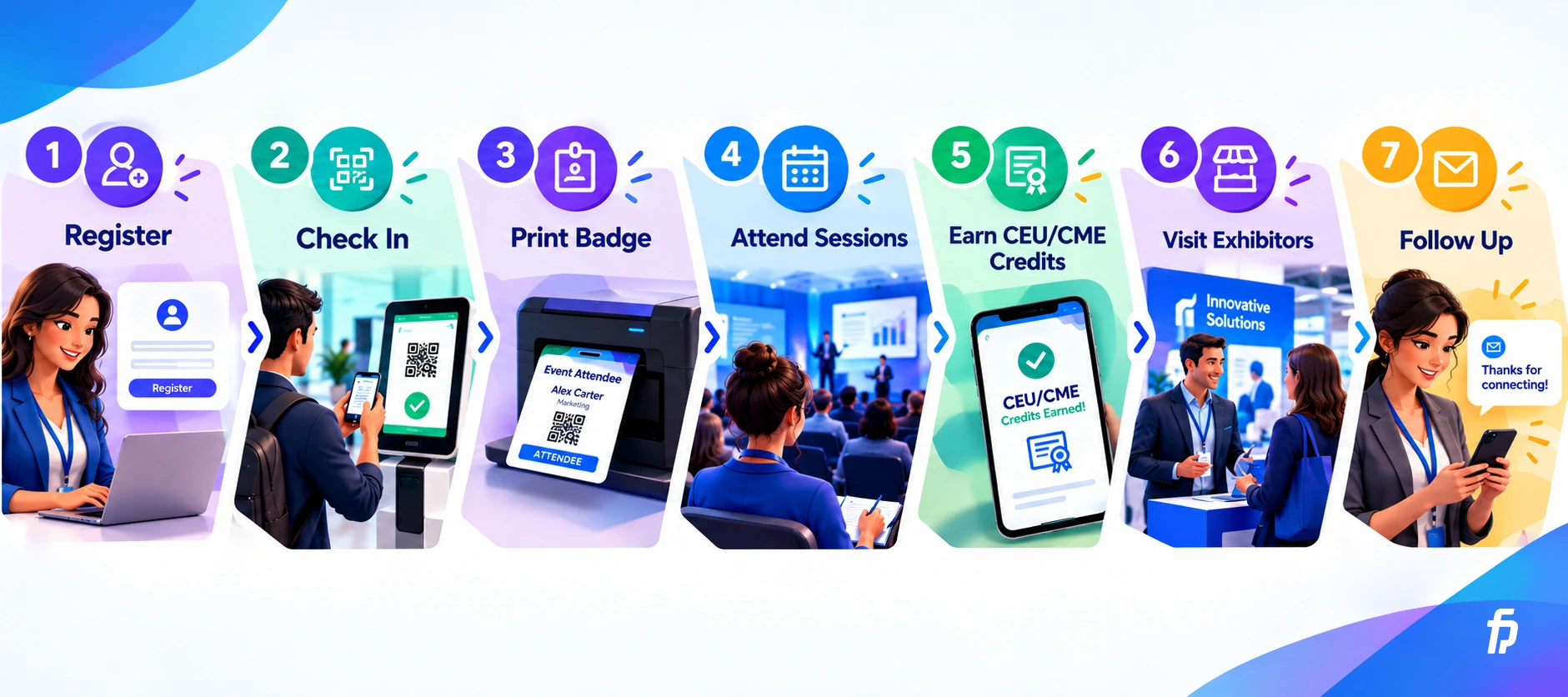
A well-designed barcode can support each of these steps.
The attendee's registration confirmation can provide the first scan.
That scan can locate the registration record and help print the badge.
The badge can then become the attendee's identification throughout the event, supporting session tracking, continuing education records, certificate issuance, and exhibitor lead retrieval.
Instead of creating separate identification methods for every activity, the organizer can build an event technology environment around a consistent attendee identifier.
That is where a small barcode can have a surprisingly large impact.
The Bottom Line
A barcode may occupy only a small part of an event badge, but it can connect a large part of the event experience.
It can help make check-in faster, simplify badge printing, support session attendance tracking, document CEU and CME participation, enable exhibitor lead retrieval, and give organizers more useful information about attendee engagement.
(And creating one does not necessarily require a complex or expensive solution.)
An organizer can use an integrated registration and badge printing system, a specialized barcoding tool, or even Microsoft Word and Mail Merge for a smaller event.
The important thing is to plan the barcode as part of the event technology strategy rather than treating it as an afterthought.
A good badge identifies the attendee.
A good barcode makes that identity useful.
Don't underestimate the power of a good scan.
Frequently Asked Questions About Event Badge Barcodes
Why should event badges have a barcode?
An event badge barcode gives each attendee a machine-readable identifier that can be used throughout the event. It can support session tracking, CEU and CME attendance tracking, certificate issuance, and exhibitor lead retrieval.
More importantly, using a consistent attendee identifier can help organizers connect these interactions to the attendee's event record. This creates a more complete picture of attendees’ engagement, from the sessions they attended to the exhibitors they visited.
Can a barcode on the registration confirmation be used for event check-in?
Yes. The barcode or QR code on the registration confirmation can be scanned at event check-in to locate the attendee's registration record. Once the record is found and the attendee's registration is verified, the badge can be printed.
The barcode on the registration confirmation and the barcode ultimately printed on the badge can use the same identifier, allowing the attendee's identity to remain consistent from registration through the event.
Is the barcode on the badge the same as the barcode on the registration confirmation?
It can be.
An organizer may use the same confirmation number or attendee identifier in both places. Alternatively, the badge can use a simpler badge ID specifically designed for onsite use.
A shorter badge ID can be particularly useful because exhibitors may choose to type the badge number into their lead retrieval app instead of scanning the barcode. This provides a simple alternative when scanning is inconvenient or when an exhibitor's device has difficulty reading the badge.
What information should be encoded in an event badge QR code?
The barcode or QR code does not need to contain the attendee's complete registration information.
It can contain a unique identifier, such as the registration confirmation number or a simpler badge ID. The scanning application can then use that identifier to locate the attendee's information.
For lead retrieval, for example, the exhibitor's application can use the identifier to retrieve the attendee record and display the available contact information.
Can a QR code on a badge be used for session tracking?
Yes. A session tracking application can scan the attendee's badge and associate the scan with a specific session.
For conferences that offer CEU, CME, continuing education credits, or certificates, this provides a convenient way to document actual session attendance. With a kiosk-style solution such as Fairplicity's fpSessions, attendees can scan their own badges as they enter sessions, creating an electronic attendance record without requiring paper sign-in sheets.
Can the same badge barcode be used for exhibitor lead retrieval?
Yes. The badge barcode can be used by a lead retrieval application to identify the attendee and retrieve the information associated with their event record.
Exhibitors can then qualify the lead, add notes, answer survey questions, assign a lead rating, and capture follow-up information.
If an exhibitor does not want to scan, a simple badge ID can also give them the option to type the identifier into the lead retrieval app.
Can I create QR code badges using Microsoft Word?
Yes. Microsoft Word and Mail Merge can be used to create pre-printed badges with attendee information and QR codes, particularly for smaller events. The process requires an attendee data source, a unique identifier, a badge template, and a method of generating the QR codes. A separate step-by-step guide will cover this process in detail.
Should event badges be pre-printed or printed onsite?
Both approaches can work. Pre-printing is often a cost-effective option reducing onsite printing requirements when most attendees register before a production deadline and fast badge pickup is important . On-demand printing provides greater flexibility for late registrations, walk-ins, changes, and reprints. A hybrid approach can combine the two by pre-printing badges for attendees who register before a cutoff date while printing badges onsite for late registrations and other exceptions.
What is the best barcode format for an event badge?
There is no single format that is right for every event. QR codes are widely supported by modern smartphones, tablets, and scanning devices, while traditional barcodes may be appropriate when an event's existing applications are designed around a particular format.
The key is to select a format that is compatible with the check-in, session tracking, lead retrieval, and other applications that will use the identifier.
What is the best size for a QR code on an event badge?
There is no single size that works for every badge and scanning environment. The appropriate size depends on the amount of information encoded, the QR code generation method, the printing quality, the scanning device, and the distance from which it will be scanned.
Organizers should test the actual printed badge using the devices and applications that will be used onsite rather than relying only on a digital proof.
Do I need a specialized barcoding system to create event badges?
Not necessarily. Barcodes and QR codes can be generated through registration and badge printing software, barcode generation tools, or even a Microsoft Word and Mail Merge. The important consideration is whether the barcode is compatible with the applications that need to scan it.
Can a badge barcode work without an Internet connection?
Yes, depending on the application. Many modern event applications can download the necessary attendee information to a device before the event and scan badges offline. Organizers should confirm that their specific check-in, session tracking, and lead retrieval systems support offline operation.